Search

Learn More About Wondershare Products
Three Ways to transfer music and photos from Android to Android
A lot of us shuffle our phones and when you do so, you need to copy a great deal of stuff. If you are wondering as to how to transfer music from android to android, here we will elaborate three different ways of making this happen.
Not only this, the steps which we will list will also allow you to know how to transfer photos from android to android. You are free to choose any of these three methods ba_x_sed upon your needs and preferences. The core idea is to make it easier for people to share their media files from one device to another.
- 1. Transfer Music and Photos with Wondershare Mobiletrans
- 2. Transfer music and photos over Bluetooth
- 3. Transfer music and photos over Wi-Fi
Wondershare MobileTrans - 1-Click phone to phone transfer
- 1-Click phone transfer, 100% Safe and Risk-free
- transfer contacts from android to android
- Transfer Messages from iPhone to iPhone
- Support iOS, Android, WinPhone and Symbian
- Backup phone data to computer
- Restore from backup in Lossless Quality
- Permanently Erase Your Old Android Phone
Part 1
Transfer Music and Photos with Wondershare MobiletransMobiletrans by Wondershare is one of the top rated software which comes packed with some of the best features.
Here are some of the salient features which this software has to offer.
· Easy transfer of different files from one phone to other. The supported file type includes Contacts, Text messages, Calendar, Photos, Call logs, Video, Music
· Quick backup of data easily
· You can also retrieve data from your iCloud backup to your android phone with the use of this software
· It helps in permanently erasing data on your old phone
· It supports a wide array of different phones and multiple operating systems as well.
When you are looking for easy android music transfer or even if you are looking to know how to transfer pictures from android to android, here are some of the easy steps which you need to follow when using Wondershare Mobiletrans.
· Download the Wondershare Mobiletrans software on your PC
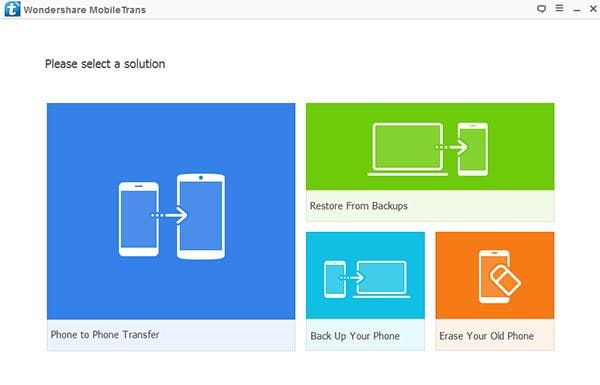
· When you run the application, you will find multiple options. Choose ‘phone to phone transfer’ from the list offered
· Now, connect both the phones to your PC using USB cables. You need to wait for the software to recognize both the devices
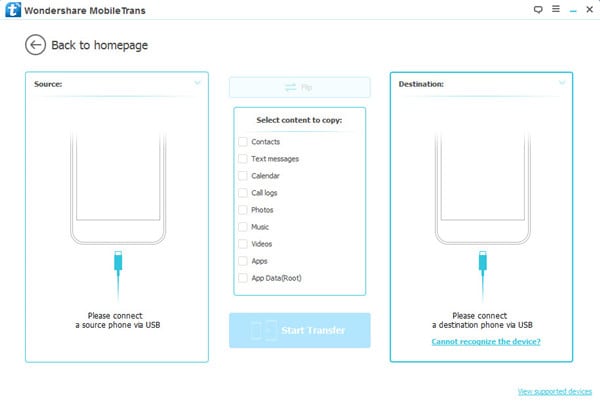
· There is a flip button using which you can use to change the source and destination models

· You will find a list of different content which you can copy
· Select Photos and Music from the list

· Click on ‘Start Copy’ to start the process of copying content from source to destination

· If you want to clear your destination phone, you can tick on the box that states, ‘clear data before copy’. This will wipe off all existing data from your destination phone
· You need to be sure that both the phones are connected when the copying is ongoing
· When the copying of data has successfully completed, you can then disconnect both the phones and enjoy the copied content in your new phone
These are the simple steps which should be followed in order to ensure that the transfer can be easily carried out. While this is not the only method which needs to be used, there are several other alternatives which can be opted for.
Part 2
Transfer music and photos over BluetoothBluetooth transfer is yet another common method which is used by a lot of people. If you want to transfer music to android or even pictures, here are the quick steps you need to follow.
· Take both the devices with you.
· Turn on Bluetooth on both the devices.
· From the sender device, mark the photos and music which you want to copy.
· You can select to mark multiple files in one go by choosing the option Mark Several.
· Once you have selected the files, you then need to hit share/send.
· Click on share/send via Bluetooth.
· If the destination device is already paired, it will show in your device list.
· If the destination device is not paired, make sure that your device is visible to all.
· You should make an attempt to pair your device.
· You will be prompted to enter the pairing code on both devices.
· Once the devices have been paired, choose the destination device from the list of active devices in the sender list.
· You will be prompted to authorize the acceptance of incoming file.
· Click on yes and you will receive the files in your new phone.
These are the core steps to be followed for easy and free transfer of photos over Bluetooth. However, for this process, you need to be sure that both the phones are kept close to each other.
Part 3
Transfer music and photos over Wi-FiIf you want to share your media files over Wi-Fi, here are the steps to be followed.
· It is important to ensure that both the devices should have an internet connection and should be connected to the Wi-Fi.
· You need to download the Wi-Fi file transfer app on your PC.
· The app will offer you a url which you can punch in your web browser and you will be able to see the internal memory and SD card of the connected devices.
· Once you have the data available with you, it is very easy to transfer all your files as you can simply copy the content from one device to another.
These are some of the diverse ways by which you can easily transfer your content without any hassles. You can choose any of the methods, but those who are on the lookout for a safe and secure way should make it a point to opt for Wondershare Mobiletrans as it is undoubtedly the best options. it offers a safe and reliable form of copying content from one android phone to another.
Android Manager - One Stop Solution to Manage Your Mobile Lifestyle
- One click to download, manage, import & export, transfer your music, photos and videos.
- De-duplicate contacts, switch devices, manage your app collection, backup & restore and send messages from your desktop.
- Mirror your android device to send messages, and play Android games on your computer.
- Transfer Files among your mobile devices without limitation.
- Optimze your device on the go with the MobileGo app.