
- • How to Edit Videos for YouTube
- 2.1 How to Use YouTube Video Editor
- 2.2 How to Use YouTube Enhancements Tool
- 2.3 How to Edit Title, Description, and Tags
- 2.4 How to Edit Audio on YouTube
- 2.5 How to Add Logo or Watermark
- 2.6 How to Edit Uploaded YouTube Videos
- 2.7 How to Remove YouTube Videos
- 2.8 How to Add Music to YouTube Video
- 2.9 How to Edit Channel Description
- 2.10 How To Add Custom Thumbnails
- 2.11 How to Blur Faces or Objects
- 2.12 How to remove black bars from existing videos
- 2.13 What is YouTube Creative Commons
- 2.14 Standard YouTube License vs. Creative Commons
- 2.15 How to Add YouTube Annotations and Cards
- 2.16 How to Change the Privacy Setting
- 2.17 How to Add Subtitles and Closed Captions
How to Edit Youtube Videos by the YouTube Video Editor

Mar 27, 2024• Proven solutions
Note: From 20th September 2017 users will no longer be able to use the complimentary editing suite. Check the best YouTube video editor alternatives from this complete guide. Now, it is back again.
Video editing usually requires a fair amount of technical knowledge and professional software. But YouTube has introduced its new YouTube Video Editor. It’s deceptively simple compared to the traditional desktop editing programs.
If you haven’t tried the YouTube editor, it’s time to get started.
It's easy to learn and the guide below will give you an introduction for editing videos on YouTube.
You May Also Like:
Royalty free music for YouTube Videos >>
Best Screen Recorders for YouTube >>
YouTube Video Dimensions/Size: Guide for Upload Settings >>
The Best Video Editors for YouTube >>
How to edit a YouTube video with Filmora
If you want to have more controls on editing YouTube video, here we recommend using Filmora.
You can use it to trim/cut/split YouTube videos with handy tools. It also offer more than 50 royal free music to use. Various video filters and effects are available to make your videos amazing. The best part is you can apply animated text/titles to videos like a pro. After editing, you can directly upload videos to YouTube.
Now, download it now to have a try!


How to Use YouTube Video Editor to Edit Video on YouTube
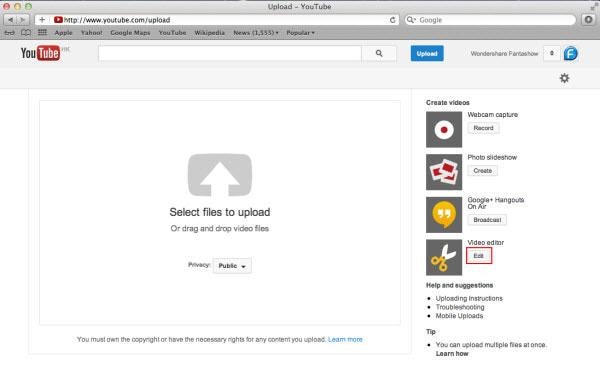
Step 1. Get access to YouTube Video Editor
Sign in to your YouTube (or Google) account. To get access to YouTube Video Editor, you can go directly to YouTube studio (video editor). Or click avatar icon in your YouTube site > YouTube Studio.
Learn more about Upload MP3 to YouTube
Step 2. Add your videos to the timeline
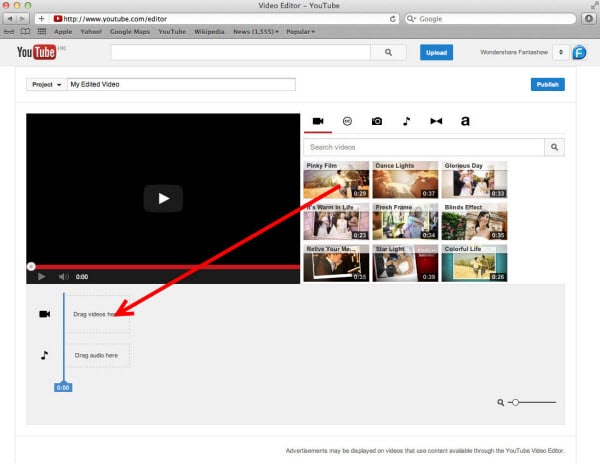
After getting to the editor, all your YouTube videos will appear. If you want to add a clip from the pool of videos into the project, simply drag it onto the timeline or hit the plus icon in the top right hand corner of each clip. You can also add any YouTube videos that were uploaded with a "Creative Commons" license.
To do this, go to the CC tab, find a video and drag it to the timeline.
Looking for best YouTube video editor alternatives? Check this complete guide here >>
Step 3. Edit the videos as you like
With the YouTube video editor, you can quick fix your videos, add audio track of your video, add texts, use various filters and more. Below is a detailed guide on how to use YouTube video Editor.
#1 Trim/Cut/Split video
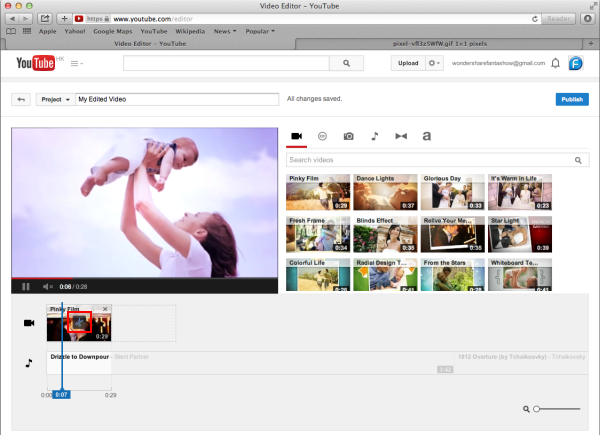
To cut or split your video, hover over the target clip and hit the scissor icon to cut the clip into pieces. You can also cursor over the edge of your video in the timeline and drag the handle to shorten or trim your video.
#2 Change video settings
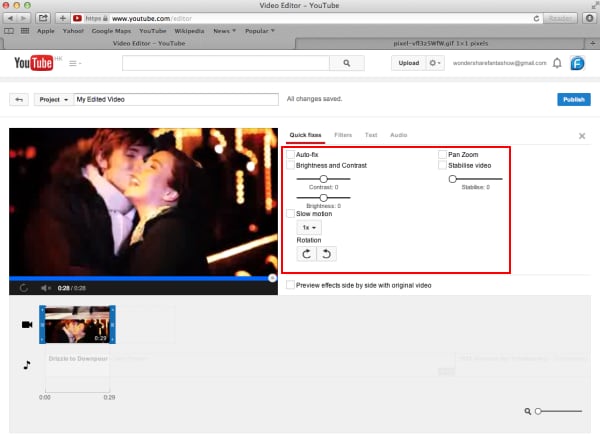
YouTube Video Editor also provides the "Quick fixes" function which does a quick analysis of the video and tweaks its color, brightness, and contrast settings automatically.
You can just double click the video to enter the "Quick fixes" tab and easily change brightness and contrast, add slow motion and pan zoom effect, and stabilize, audio fix or rotate video.
#3 Add filters
You can also add stunning video filters provided by this editor. To get access this function, double click the video and switch to the "Filter" tab.
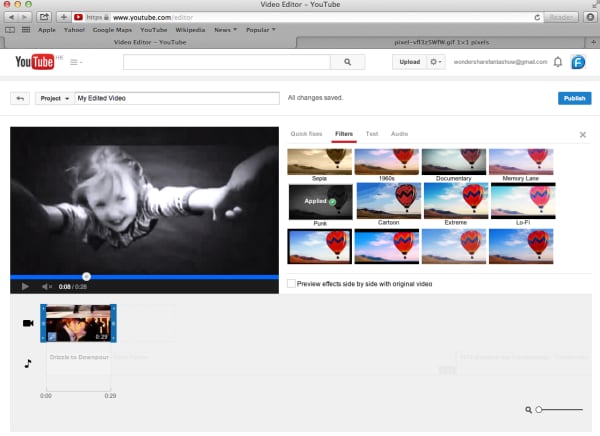
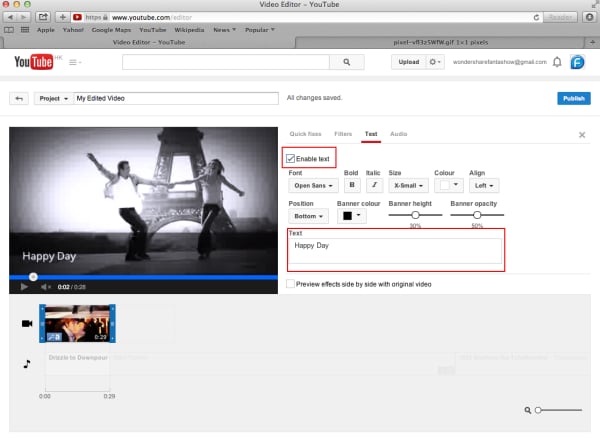
#4 Add text to video
To add text to video, go to the "Text" tab, tick "Enable text" and enter the text to the text column. Then customize the font, size, color, position of the text as you like.
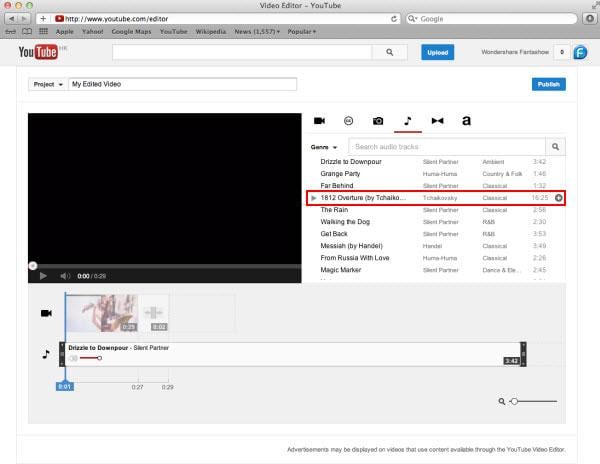
#5 Add music to video
YouTube also allows you to swap out the audio with one of its licensed tracks. To do this, go back to the main interface of the editor and click the Audio tab. Then select a song from the library and either drag it to the soundtrack timeline or press the plus sign to the right of each title.
Note: You should note that some are songs are subject to licensing agreements, which means YouTube will automatically add advertisements to the video clip.
Another short coming is that you can't edit the audio track at all. If a song is longer than your video, you can do nothing but let it play from the beginning until your video stops.
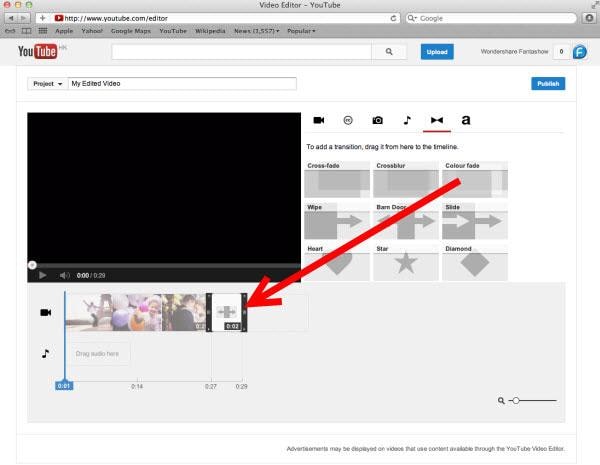
#6 Add transitions to video
If several video clips have been added to the timeline, you need transition to make the whole project smoother. To add transition, go to the Transition tab and choose from 16 transition effects.
YouTube Video Editor is really easy to use, but it only provides some basic video editing functions and is really easy to crash when dealing with large file. If you want to make your video more professional, try Wondershare Filmora.
This desktop video editing tool can help you easily complete video editing tasks.
Download it now to have a try!
For teachers and tutors, there are various ways of using YouTube in the classroom.
by Richard Bennett Apr 01, 2024 11:39 AM
Below are the top ten educational YouTube channels that both students and teachers will find usefu
by Richard Bennett Apr 01, 2024 11:39 AM
The process is easy and fun and it will provide you with a great value for sure.
by Richard Bennett Apr 01, 2024 11:38 AM
Richard Bennett
staff Editor