
Wondershare UniConverter
-
 Convert AVI video to MPEG, MOV, MKV, and 1000+ video/audio formats.
 - Its conversion speed is 30x faster takes to its GPU accelerator.
- Enables you to transfer videos between your computer and mobile devices.


AVI
- TRY IT FREE TRY IT FREE
- 1. Convert Popular Formats to AVI+
-
- 1.1 WMV to AVI Converter
- 1.2 MOV to AVI Converter
- 1.3 MOV to AVI Converter for Mac
- 1.4 MKV to AVI Converter
- 1.5 Free MP4 to AVI Converter
- 1.6 WebM to AVI Converter
- 1.7 MPG to AVI Converter
- 1.8 FLV to AVI Converter
- 1.9 Convert ISO to AVI
- 1.10 Convert M4V to AVI
- 1.11 3GP to AVI Converter
- 1.12 RMVB to AVI Converter
- 1.13 DivX to AVI Converter
- 1.14 WLMP to AVI Converter
- 1.15 VRO to AVI Converter
- 1.16 Video TS to AVI Converter
- 1.17 DV to AVI Conveter
- 1.18 MTS to AVI Converter
- 1.19 VOB to AVI Converter
- 1.20 Convert MP3 to AVI
- 1.21 MKV to AVI Conveter
- 1.22 GIF to AVI Converter
- 1.23 MP4 to AVI Converter with VLC
- 1.24 Convert FLV to AVI
- 2. Convert Other Formats to AVI+
-
- 2.1 ASF to AVI Converter
- 2.2 MXF to AVI Converter
- 2.3 MOD to AVI Converter
- 2.4 Convert MP4 to AVI
- 2.5 Convert MP4 to AVI on Mac
- 2.5 Convert DVD to AVI
- 2.7 Convert WTV to AVI
- 2.8 Convert DVR to AVI
- 2.9 Convert Torrent to AVI
- 2.10 Convert AVCHD to AVI
- 2.11 Convert MSWMM to AVI
- 2.12 Convert OGV to AVI
- 2.13 Convert YouTube video to AVI
- 2.14 Convert Windows Movie Maker Video to AVI
- 2.15 Convert Windows DVD Maker Video to AVI
- 2.16 Burn DVD to AVI with handbrake
- 2.17 Export Windows Live Movie Maker in AVI
- 2.18 Free M2TS to AVI Converter
- 2.19 Convert JPG to AVI
- 2.20 Convert PPT to AVI
- 3. Convert AVI to Popular Formats+
-
- 3.1 AVI to MOV Converter
- 3.2 AVI to MOV Online Converter
- 3.3 AVI to MKV Converter
- 3.4 AVI to 3GP Online Converter
- 3.5 AVI to M4V Converter
- 3.6 AVI to FLV Converter
- 3.7 AVI to WMV Converter
- 3.8 Free AVI to MPEG Converter
- 3.9 AVI to SWF Converter
- 3.10 AVI to DVD Converter
- 3.11 AVI to DivX Converter
- 3.12 AVI to ISO Converter
- 3.13 AVI to TS Converter
- 3.14 AVI to VOB Converter
- 3.15 Convert AVI to MP4
- 3.16 Convert AVI to MP3
- 3.17 AVI to MPEG Converter for Mac
- 3.18 AVI to MPEG Converter
- 3.19 Convert AVI to MP4 with VLC
- 3.20 Convert AVI to WAV
- 4. Convert AVI to Other Formats+
-
- 4.1 Convert AVI to iTunes
- 4.2 Convert AVI to WebM
- 4.3 Convert AVI to 3GP
- 4.4 Convert AVI to iMovie
- 4.5 Import AVI to iMovie
- 4.6 Convert AVI to Xvid
- 4.7 Convert AVI to Chromecast
- 4.8 Convert AVI to MPEG2
- 4.9 Convert AVI to MPEG4
- 4.10 Convert AVI to iPod
- 4.11 Convert AVI to GIF
- 4.12 Convert AVI to iPhone
- 4.13 Convert AVI to FCP Mac
- 4.14 Convert AVI to YouTube
- 4.15 Burn AVI to DVD
- 5. Convert AVI Online +
- 6. Play AVI+
-
- 6.1 Top AVI Player
- 6.2 Play AVI on Mac
- 6.3 Play AVI on iPad
- 6.4 Play AVI on iPhone
- 6.5 Play AVI on Xbox one
- 6.6 Play AVI on Xbox360
- 6.7 Play AVI with VLC Player
- 6.8 Play AVI in QuickTime
- 6.9 Play AVI in Windows Media Player
- 6.10 Play AVI in Samsung galaxy s6
- 6.11 Play AVI on Apple TV
- 6.12 Play AVI on TV
- 7. AVI Tips & Tricks+
-
- 7.1 MOVAVI Alternative for Windows
- 7.2 MOVAVI Alternative
- 7.3 Free AVI Converter on Mac
- 7.4 AVI Converter for Windows 10
- 7.5 Free AVI Converters on Mac
- 7.6 AVI Converters
- 7.7 Free AVI Player for windows
- 7.8 AVI Player for Mac
- 7.9 AVI Cutter
- 7.10 Make AVI Smaller
- 7.11 Reduce AVI File Size
- 7.12 Compress AVI
- 7.13 Add Metadata to AVI
- 7.14 3D AVI Creator
- 7.15 Repair AVI File
- 7.16 What Is an AVI File
All Topic
- DVD Users
- Social Media Users
- Camera Users
- Photography
- Creative Design
- Movie Users
- Travelling Fans
- Educational Users
- More Solutions
- Holidays
- Game Lovers
- Other Tips
Top 6 Best Free AVI to MPEG Converter
by Kayla Morrison • 2024-01-11 10:28:43 • Proven solutions
You might have been anticipating converting AVI to MPEG, but you are unsure of the right AVI to MPEG converter to employ. The act of converting media files from one format to the other has been practiced for over a decade, and during this time, it has seen exponential growth on tools used in file conversion. File conversion, such as converting AVI to MPEG, is majorly being triggered by compatibility issues among media players and other media devices. Other persons convert AVI to MPEG as they enjoy their files being in the latter format. Nonetheless, converting AVI to MPEG requires powerful and reliable AVI to MPEG converter tools for the process to be a success. Check out in this article converter utilizes you can confidently rely on.
- Part 1. Top 5 Ways to Convert AVI to MPEG Easily and Free
- Part 2. Best AVI to MPEG Converter – Wondershare Uniconverter
Part 1. Top 5 Ways to Convert AVI to MPEG Easily and Free
Here we take a look at the best Free AVI to MPEG converters to help you change files into the formats that suit you the best.
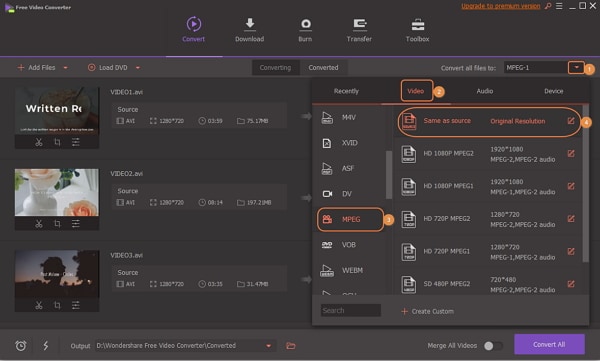
1. Wondershare Free AVI to MPEG Converter
Wondershare Free AVI to MPEG Converter is a simple yet powerful tool designed to run on 30X faster speed than any other program of its kind supports 1000+ video and audio formats, supports batch convert, and there is short to almost zero waiting time for upload and download.
The manual to convert AVI to MPEG.
Step 1: Download Wondershare Free Video Converter and launch it on your computer.
Step 2: You can add AVI files by clicking the +Add Files button.
Step 3: Select the output format by clicking the drop-down icon beside the Convert all files to and select MPEG.
Step 4: Click the Convert All button to start AVI files to MPEG conversion, and you can get the converted files by tapping the Output icon.
2. Squared 5
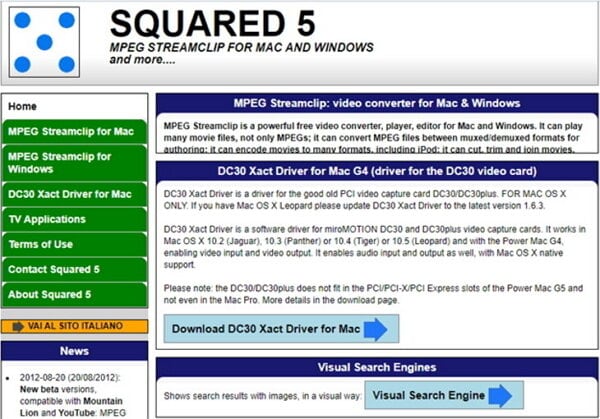
This is yet another powerful AVI to MPEG converter suite, which is also regarded as a MPEG Stream clip. It can be used to open and play a vast number of movie formats, perform video edit, and export them to QuickTime, AVI, DV, etc.
To convert AVI to MPEG, you just follow these simple steps.
Step 1: Launch the program on your computer and then click the File menu to Open Files. Choose AVI files you intend to convert and click the Open to import.
Step 2: Now, click the Export to Other Formats, and on the preview window, select the Export to MPEG.
Step 3: click the Convert.
3. iSquint
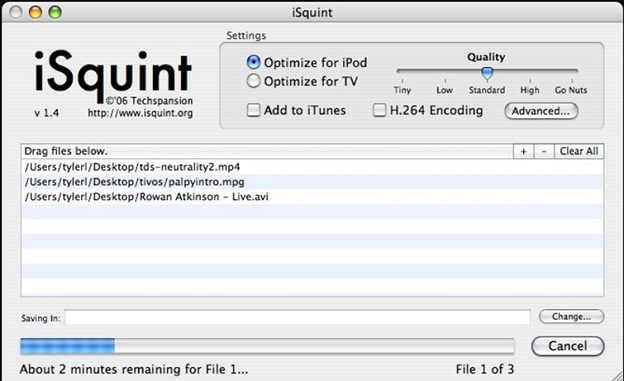
This program is widely used among Mac and Windows users as it offers fast and clean conversion and includes encoding of the video. It provides advanced settings to curate well-converted videos.
Guide on using iSquint convert AVI to MPEG.
Step 1: From the primary window, click on the Add Files icon then select the Add File(s) option to upload AVI files on to the program.
Step 2: Click the Profile drop-down menu and select MPEG video format from the General Video tab.
Step 3: Click the Convert to complete converting AVI to MPEG.
4. FFmpeg
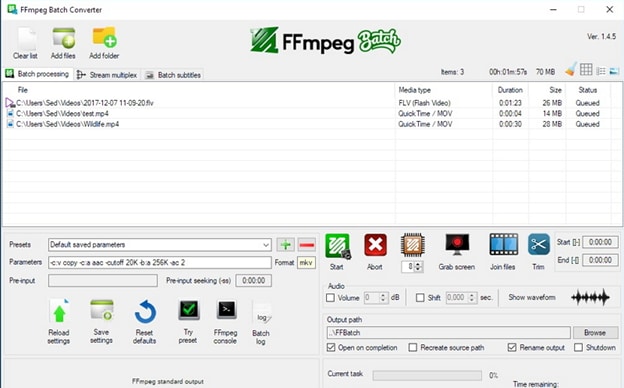
FFmpeg is a complete and cross-platform freeware solution to execute conversion processes like AVI to MPEG, record, and stream audio and video. It uses command lines to convert files.
Step 1: Upload AVI files by clicking the Add Files and following onscreen instructions.
Step 2: In the Parameters dialogue box, enter the following command (edit .flv to .avi).

Step 3: Click the Start button to initiate the conversion process.
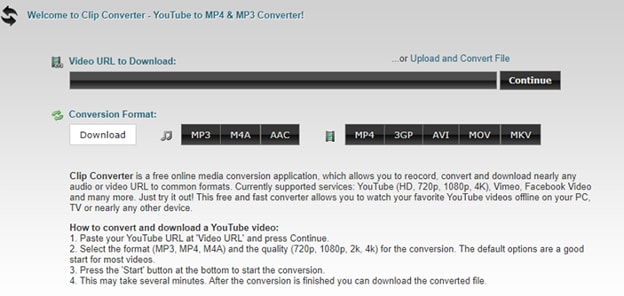
5. ClipConverter.cc
This is a powerful online AVI to MPEG video converter, which allows you to record, convert, and download your videos and audios from almost all formats.
Manual on converting AVI to MPEG using ClipConvert.cc.
Step 1: Go to ClipConverter.cc webpage and click on the appropriate button to upload AVI files.
Step 2: Select the MPEG as an output format and the desired file quality.
Step 3: Finally, click on the Start button to initiate the conversion process.
Part 2. Best AVI to MPEG Converter – Wondershare Uniconverter
Wondershare UniConverter (originally Wondershare Video Converter Ultimate) is a professional AVI to MPEG converter suite that can convert a file at 30X faster than its peers. It supports nearly all Video and audio formats on import and export.
Wondershare UniConverter - Best Video Converter for Mac/Windows
-
Convert AVI to MPEG, MOV, and other 1000 formats without losing quality.
-
Burn AVI and MPEG files to DVD with free menu templates.
-
Built-in editor with a real-time preview, like Trim, Crop, Add subtitles, Apply Effects, etc.
-
Ultra-fast conversion speed to convert files in batch with zero quality loss.
-
Download videos from YouTube and other 10,000 online sites.
-
Convert AVI to videos for easy playback on any devices, including iPhone, iPad, Android devices.
-
Support a versatile toolbox: Add Video Metadata, GIF Maker, Cast Video to TV, VR Converter, and Screen Recorder.
-
Supported OS: Windows 10/8/7/XP/Vista, macOS 11 Big Sur, 10.15 (Catalina), 10.14, 10.13, 10.12, 10.11, 10.10, 10.9, 10.8, 10.7
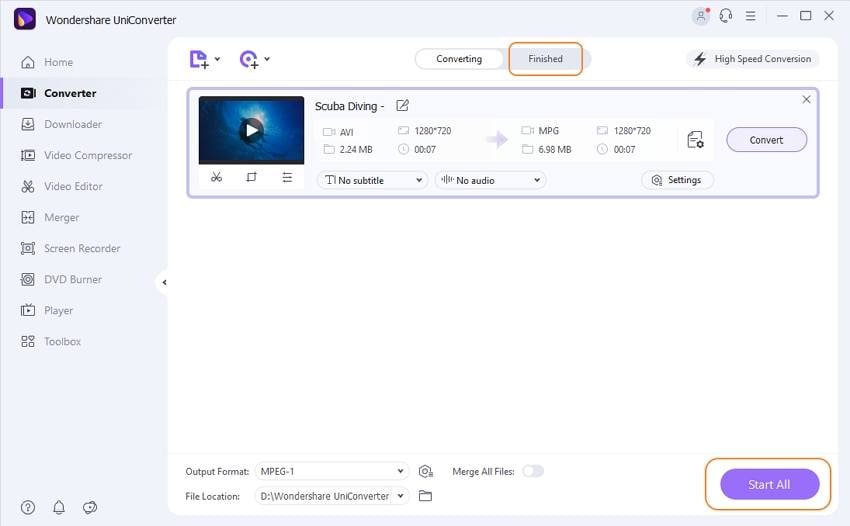
How to convert AVI to MPEG with Wondershare Uniconverter
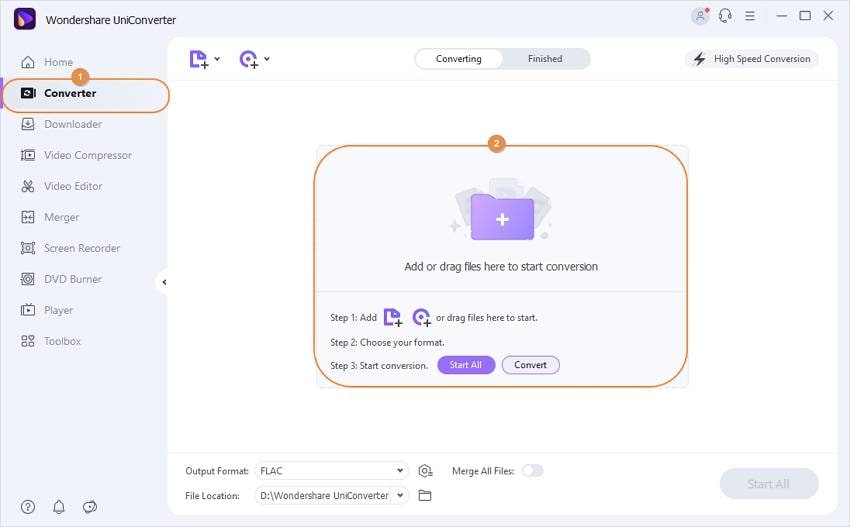
Step 1 Run Wondershare Uniconverter and add AVI files.
From the primary window, click on the +Add Files to import AVI files.
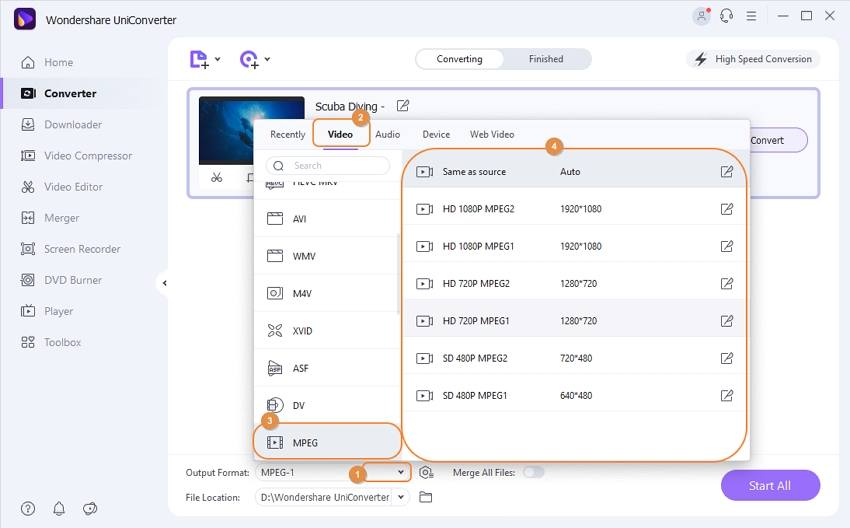
Step 2 Choose the target format as MPEG.
Tap on the drop-down icon on the right to Output Format. Click on the video category and select the MPEG.
Step 3 Convert AVI to MPEG.
Click on the Start All button to convert AVI to MPEG files. The processed files can also be managed from the Finished tab on your PC.
Your complete video toolbox

Other popular Articles From Wondershare

Your AI Video Toolbox

One-step solution for all your video conversion and editing needs.
 Security Verified. 4,380,764 people have downloaded it.
Kayla Morrison
staff Editor